

















Tools for CAPTCHA Accessibility
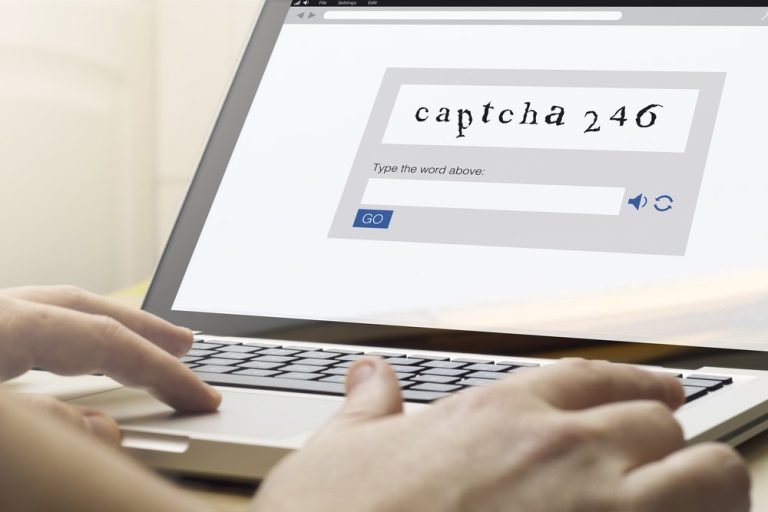
Which one of these pictures contains a boat? Click here to let us know you’re not a robot. If either phrase sounds familiar to you, then you know what a CAPTCHA is. CAPTCHAs, or Completely Automated Public Turing test to tell Computers and Humans Apart, is a way websites differentiate a human site visitor from an automated bot. Users may be asked to identify images that contain certain objects, type text they see in a text block, or check a box to confirm they are human. They are a great tool to ensure your website doesn’t get flooded with bogus traffic and form submissions and helps protect you and your customers from fraud. There are many tools available to help you incorporate CAPTCHAs into your site. Like many things in web design, ensuring CAPTCHA accessibility is the responsibility of the website owner.
Are CAPTCHAs Accessible?
As with many website accessibility issues, the answer isn’t a simple one. CAPTCHAs can be hard for anyone – do you overanalyze if that traffic light is in one box or if it is slightly invading a second box? Yea, we do too. CAPTCHA accessibility can be challenging, especially since many CAPTCHAs rely on visual elements that those who have difficulty seeing may not be able to solve. Some sites utilize audio to help overcome CAPTCHA accessibility issues, but they can still be too difficult for hearing impaired people and won’t help those who are both hearing and vision impaired. And CAPTCHAs usually don’t allow for ALT text, a primary means to overcome accessibility obstacles. Despite this, CAPTCHA accessibility cannot be ignored. The Americans with Disabilities Act (ADA) is federal legislation that prohibits discrimination based on disability. For a website to be compliant, it must be able to be used by those who use assistive devices, and if it can’t be, it could be seen as discrimination and not compliant with the law.
What Are Alternatives to CAPTCHA?
To help make CAPTCHA accessibility easier, some CAPTCHA creators have provided some tools.
reCAPTCHA
Google’s reCAPTCHA is a popular option. Google tackled CAPTCHA accessibility by providing two solutions that are free and can be integrated into webforms – reCAPTCHA version 2 and reCAPTCHA version 3. Google’s reCAPTCHA v2’s accessibility tool uses the accessible CAPTCHA example of a check box that can be processed by assistive screen readers and accessed by a mouse or keyboard. Google’s reCAPTCHA v3 accessibility tool, also referred to as No CAPTCHA, uses algorithms and machine learning to monitor cookies, mouse movement, and the number of requests from a particular IP address to distinguish between humans and bots while ensuring CAPTCHA accessibility.
hCaptcha
The approach used in the hCaptcha accessibility tool sends users with accessibility challenges to a sign-up page where they provide an email address and get an encrypted cookie, an hCaptcha accessibility token, that allows them to skip CAPTCHAs they encounter when surfing the web. This hCaptcha accessibility bypass can be used as many times as the user needs, but it must be refreshed through the sign-up page every 24 hours.
By design, CAPTCHA accessibility is problematic. The technology is supposed to make it hard to access certain functions of your site. But you don’t want to keep the estimated 1 in 5 Americans who live with disabilities from interacting with your business.
Regardless of which tool you use, none are foolproof to ensure CAPTCHA accessibility. Web Content Accessibility Guidelines (WCAG) standards cover a wide range of recommendations for making web content more accessible, but the whole endeavor can be difficult to fully integrate. You may be left with questions like, “Is reCAPTCHA WCAG compliant?” and “Are we considering the full range of disabilities with our efforts to make our site more accessible?”
You need experts to help you navigate it and bolster your site and CAPTCHA accessibility. At Paradigm, we partner with ADA-certified auditors dedicated to thoroughly evaluating the sites we develop to ensure compliance, support any necessary remediation efforts, and constantly monitor the website accessibility environment for any changes that may affect our sites. Creating an ADA compliant website design or updating a site that is out of compliance should be a priority for any business. But you don’t have to do it alone. Contact us today and we’ll help support your website accessibility for all your customers.

About the Author
Carolyn is COO at Paradigm Marketing and Design, where she oversees the agency’s day-to-day operations and ensures the quality of every deliverable that crosses our desks. At Paradigm, we believe every project has a purpose, and Carolyn makes it her mission to turn that belief into reality with strategic guidance and oversight that help businesses achieve growth goals and maintain their competitive edge.
View Bio
Related Articles

LinkedIn Blog Post Best Practices

The Power of Emojis in Marketing